
Rich Inline Template Overview
The Rich Inline Template is a prebuilt search results template that offers more flexibility and features than our Legacy Inline Template, while still allowing you to implement and customize it yourself.
It’s designed for those who want more control over the look and functionality of their search page, multiple facets, and additional display fields, without waiting for a Custom SERP.
When to use the Rich Inline Template
The Rich Inline Template is a good fit if:
- You want a faster way to launch a more advanced search results page
- You have a developer (or agency partner) who can handle implementation and styling
- You want access to features not available in the Legacy Inline Template, such as:
- Categorized results
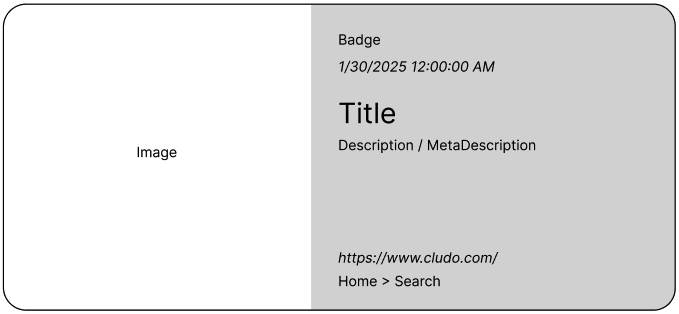
- Result fields like Badge (also often referred to as “tags”), Breadcrumb, and Date
- Multiple facets
How it works
With this documentation, you will receive:
- A script
- HTML snippets
- A basic stylesheet with structural styling
You are responsible for:
- Implementing the solution on your website
- Customizing the styling to match your brand
- Optionally configuring additional search settings using Cludo’s script parameters
The Rich Inline Template is built using React. You’ll find setup and customization documentation here.
Search Results and Display Fields
By default, the Rich Inline Template displays:
- Title
- Description
- URL
If these additional fields are configured in your crawler setup and content is indexed for them, the template will also display:
- MetaDescription (Instead of the default Description)
- Breadcrumb
- Image
- Date
- Badge (also often referred to as “tags”)
MetaDescription, Breadcrumb, and Image exist automatically on any new crawler that’s created, though they’re set to be ignored by default. Date and Badge need to be added as custom fields.
These fields are automatically included in the template layout if data is available, and you can choose to style them as needed. You can read our Crawler Setup Guide for more information on how to configure these fields, or contact support@cludo.com for more help.
Note: The crawler field names are case-sensitive and must exactly match the fields listed above.
Where to go next
Not sure Rich Inline is the right fit? See Choosing the right Search Implementation to compare it against building your own search or a Cludo-built Custom SERP.
Moving from Legacy Inline? See Moving from Legacy Inline to Rich Inline for what changes and how to get started.
Ready to design? See Cludo Studio to design and preview your search, and Setting up Crawler Fields for the Rich Inline to set up the crawler fields your results will display.
Ready to implement? See Rich Inline Template Technical Reference for the full implementation, styling, and configuration reference.